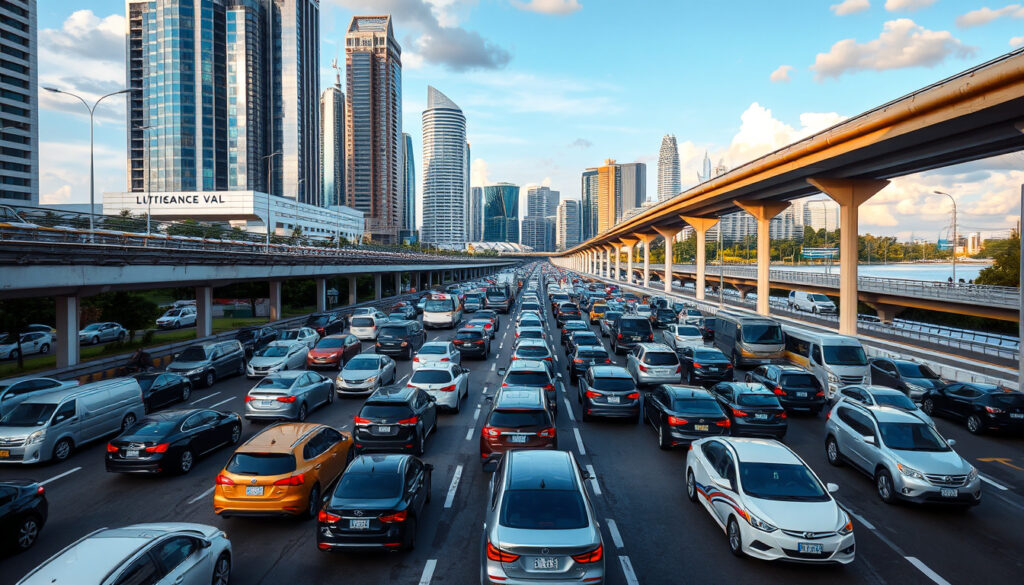
Traffic Jam Singapore Now: Live Traffic Cameras & Maps
Anyone who’s sat through a crawl on the PIE during rush hour knows Singapore’s roads can turn frustrating fast. The good news: you don’t have to guess what’s ahead. Official cameras, third-party aggregators, and navigation apps give you eyes on the expressways right now, letting you reroute before you’re bumper-to-bumper past the exit you needed. Here’s how to tap into that real-time picture and actually dodge the snarls.
Primary traffic source: LTA OneMotoring · Live camera provider: TrafficWatch · Causeway traffic cams: Jalanow · Expressway cams: Motorist.sg · Checkpoint cams: MySGRoad
Quick snapshot
- LTA OneMotoring offers an interactive map with clickable real-time camera footage across Singapore expressways (OneMotoring LTA)
- From 30 June 2026, only Woodlands and Tuas Checkpoint cameras plus two on AYE and BKE will remain operational (OneMotoring LTA)
- SG Traffic Cameras app sources data directly from LTA and covers 60+ live cameras on a map (Apple App Store)
- Specific camera counts beyond the 60+ figure reported for one app
- How third-party app accuracy compares against LTA’s official feed
- Average crossing times and jam statistics are not publicly available
- Current full expressway camera coverage continues until 30 June 2026 (OneMotoring LTA)
- After 30 June 2026, all non-checkpoint expressway cameras will be decommissioned (OneMotoring LTA)
- Drivers who rely on expressway cams should plan for reduced coverage (OneMotoring LTA)
- Bookmark checkpoint-focused feeds (Woodlands, Tuas) before June 2026
- Explore third-party aggregators like Jalanow for Causeway crossing estimates
- Consider GPS-based navigation apps as backup for real-time jam data
These platforms span official government channels, specialist cross-border monitors, and aggregator apps covering expressways and checkpoints.
| Source | Coverage | Special features |
|---|---|---|
| OneMotoring LTA (Official government platform) | AYE, BKE, CTE, ECP, KPE, PIE, SLE, TPE, checkpoints | Refreshes every minute; 4-cam view at checkpoints; real-time footage |
| SG Traffic Cameras & ERP (LTA-sourced app) | 60+ cameras across expressways and checkpoints | Live traffic news; Material Design interface; 2-click expressway access |
| Singapore Traffic Cam (Third-party aggregator) | AYE, CTE, ECP, KJE, PIE, SLE, TPE, KPE, BKE, checkpoints | 12 expressways/checkpoints listed; Material Design |
| Jalanow (Cross-border specialist) | Causeway, Woodlands, Tuas, EDL, CIQ, Second Link | Crossing time estimates; colour-coded speed map; weather integration |
| Trafficiti (Singapore-Malaysia aggregator) | Woodlands, Tuas, Causeway, Second Link, JB roads | Includes Malaysian MBJB cameras for roads like Jalan Wong Ah Fook |
| Checkpoint.sg (Travel planning tool) | Causeway and checkpoint routes | Travel time estimates; trend/forecast charts; 2-hour weather; exchange rates |
How to track traffic jams?
See traffic near you on Google Maps
Google Maps integrates real-time traffic data using GPS sensor inputs from drivers and LTA’s own closed-circuit television feeds. When you open the app and pinch to zoom into any Singapore expressway, colour-coded lines indicate flow conditions — green for free-moving, yellow for slower-than-usual, and red for congested stretches. You can tap any road segment to see the estimated delay compared to free-flow conditions. The service pulls data continuously throughout the day, making it the most accessible first check before you leave the driveway.
Use Singapore traffic camera apps
Beyond navigation, dedicated camera apps let you look at specific junctions and expressway segments directly. The LTA’s own OneMotoring platform hosts an interactive map where each camera icon opens a live feed refreshed every minute. The SG Traffic Cameras & ERP app aggregates LTA data and displays 60+ cameras on a single map, giving you a broader sweep than the official site alone. The Singapore Traffic Cam app covers 12 expressways and checkpoints including AYE, CTE, ECP, KJE, PIE, SLE, TPE, KPE, and BKE.
What apps show real-time traffic in Singapore?
SG Traffic Camera app
The SG Traffic Cameras & ERP app draws data directly from the Land Transport Authority, giving you 60+ live camera feeds on a single map interface. Its Material Design layout lets you reach any expressway camera in two taps — tap the map icon, then select your route. Beyond cameras, the app surfaces live traffic news and ERP rate information, making it a practical all-in-one for drivers who want eyes on both jams and road pricing.
Google Maps vs Waze
Both Google Maps and Waze use GPS data crowdsourced from active drivers to model traffic flow in real time. Google Maps relies on a broader data pool that includes non-navigation users who have location sharing enabled, while Waze exclusively taps its community of committed drivers who actively report incidents. The practical difference: Google Maps tends to render smoother traffic animations across the map, while Waze often surfaces more granular incident reports — stalls, police presence, road debris — from its user community. For Singapore specifically, both platforms layer in LTA’s closed-circuit television data, so the underlying jam detection shares a common foundation.
GPS-based apps detect jams by observing slowed vehicle speeds, which means they lag 3–5 minutes behind what a live camera shows. If a jam just formed, the camera reveals it before your map turns red.
How do I see traffic jams on Google Maps?
Live traffic view steps
Open Google Maps and ensure location services are enabled. The map defaults to showing roads — pinch to zoom into your area of interest. Look for thin coloured lines overlaid on road segments: green indicates speeds within 5 km/h of the free-flow limit, orange signals moderate congestion, and deep red marks severe delays. Tap a road segment to expand an info card that shows the estimated travel time and any reported incidents. To toggle specific layers, tap the layers icon (three stacked squares) and enable the “Traffic” toggle.
Check near you
If you want traffic conditions for a specific neighbourhood rather than a route, centre the map on that area and watch the colour coding update in real time as you pan. For checkpoint-bound drivers heading toward Woodlands or Tuas, zooming in on those corridors will show you current conditions on the approach roads. One limitation: Google Maps does not display live camera footage — it shows modelled travel times and inferred congestion, not what the LTA cameras actually see.
Google Maps models traffic, while live cameras show it. For trip planning before you leave, Maps is sufficient. For timing a departure to catch a ferry or clear a checkpoint, a camera feed is more precise.
What causes traffic jams in Singapore?
5 possible causes
Singapore’s road network handles more than 900,000 registered vehicles across a land area of about 733 square kilometres, creating density that consistently pushes capacity limits during peak hours. Beyond sheer volume, five recurring patterns emerge: morning and evening peak commute surges that compress traffic into narrow windows, spontaneous incidents like breakdowns and minor collisions that ripple upstream, road construction and lane closures that reduce usable road width, adverse weather — particularly heavy rain — that slows braking distances, and cross-border travel surges when Malaysian workers and weekend visitors converge on the Causeway or Second Link.
Road works and closures
The Land Transport Authority publishes road closure notices on OneMotoring, covering both planned maintenance and emergency lane restrictions. Construction zones on major routes like the Pan-Island Expressway are listed on PIE’s dedicated camera page, with the camera feed still active during works — letting you see actual conditions rather than relying on written advisories alone. Road users can subscribe to LTA notifications to receive alerts when new closures are posted.
Most jams in Singapore trace back to volume, incidents, or closures — all three show up on live cameras before your navigation app turns red. A 90-second camera check on OneMotoring before you leave can save 20 minutes in a snarl.
Road closures today Singapore?
LTA updates
The Land Transport Authority maintains a live road closure register on OneMotoring, covering planned maintenance, emergency closures, and road works across all expressways. This page is the most current official record for Singapore drivers, updated as conditions change. For road-specific details, individual expressway camera pages — like PIE’s page — include both the live camera feed and any active advisories for that corridor.
Live cams on AYE and causeway
The Motorist.sg platform offers dedicated live camera feeds for the Ayer Rajah Expressway, a key artery connecting the city to industrial zones and the AYE checkpoint route. For Causeway-specific monitoring, Jalanow covers Woodlands, Tuas, the express link, CIQ, and Second Link, pairing cameras with estimated crossing times and weather data that affects how vehicles move across the border.
From 30 June 2026, LTA will decommission most expressway cameras, retaining only Woodlands and Tuas Checkpoint cameras plus two on AYE and BKE leading to them. Bookmark the checkpoint camera page before then — it will become the primary official window for cross-border drivers.
How to use live traffic cameras (step by step)
Five tools, one workflow for checking Singapore traffic before you drive:
- Open OneMotoring — go to onemotoring.lta.gov.sg (the LTA’s official platform) and click the traffic cameras section. The map loads with camera icons across all covered expressways and checkpoints.
- Select your route — click the camera icon nearest your starting point or intended expressway. The feed opens in a side panel and refreshes automatically every minute, showing current conditions on that segment.
- Check a second camera — if your route spans multiple expressways, open the camera for the next segment to see what queue length looks like further ahead. For example, a camera at the AYE entrance can reveal whether queues extend from the checkpoint all the way to the city.
- Compare with a third-party aggregator — open Jalanow for Causeway routes or Trafficiti if you need Malaysian-side cameras for Johor Bahru roads. These add crossing-time estimates and weather overlays that OneMotoring does not provide.
- Verify with GPS navigation — cross-reference what the cameras show against Google Maps or Waze for real-time modelled travel times. If the camera shows free-flowing traffic but Maps still shows an orange segment, check whether a recent incident was reported in the app.
Timeline signal
Four moments define the near future for Singapore traffic cameras:
| Period | What changes | Impact for drivers |
|---|---|---|
| Now – 30 June 2026 | Full expressway camera coverage active on OneMotoring; 4-cam checkpoint views; 60+ cameras via third-party apps | Maximum visibility across all major routes |
| 30 June 2026 | LTA decommissioned cameras on CTE, ECP, KPE, PIE, SLE, TPE, and other expressways | No official live feed for most expressway segments |
| Post-30 June 2026 | Only Woodlands Checkpoint, Tuas Checkpoint, and two cameras on AYE/BKE remain operational | Checkpoint approaches visible; expressway monitoring relies on GPS data only |
| Ongoing | Third-party aggregators (Jalanow, Trafficiti, Motorist.sg) continue operating independently of LTA feed changes | Private cameras and Malaysian-side feeds remain available |
The pattern is clear: expressway camera coverage narrows significantly in mid-2026, shifting the burden of jam detection to GPS-based tools for most routes outside the checkpoints.
Confirmed vs unclear
Here’s what we know from verified sources and what remains uncertain:
Confirmed
- LTA OneMotoring provides real-time camera feeds across Singapore expressways (OneMotoring LTA)
- The page refreshes every minute (The Smart Local)
- SG Traffic Cameras app covers 60+ cameras sourced from LTA (Apple App Store)
- Checkpoint.sg offers 2-hour weather forecasts alongside travel data (The Smart Local)
- Most expressway cameras will be decommissioned on 30 June 2026 (OneMotoring LTA)
Unclear
- Precise camera count per expressway beyond the 60+ aggregate figure
- Whether third-party apps have formal data-sharing agreements with LTA or scrape feeds
- Average crossing times at peak hours are not publicly published
- User ratings or accuracy comparisons between navigation apps in Singapore
What experts say
Please be informed that from 30 June 2026 onwards, only the traffic cameras at Woodlands and Tuas Checkpoints (including two traffic cameras on the AYE and BKE leading to the Checkpoints) will remain in operation.
— LTA OneMotoring (Land Transport Authority official notice)
The OneMotoring website is your best bet for fuss-free information – it’s an official website by LTA after all, so you know the info here is reliable.
— The Smart Local (Singapore lifestyle publication)
Check traffic in seconds. Avoid jams, save time, drive smarter.
— SG Traffic Cameras & ERP (app description)
The pattern across all three sources points in one direction: the Land Transport Authority sits at the top of the data chain, and every reliable tool in Singapore traces back to its camera network. Whether you use the official site, a third-party app, or a navigation platform, you’re ultimately seeing what LTA’s closed-circuit television network captures — with the notable exception that from mid-2026, that window narrows considerably for most routes.
Bottom line
For Singapore drivers today, real-time traffic visibility is strong: OneMotoring delivers the official feed refreshed every minute, third-party apps add convenience layers like crossing-time estimates and weather overlays, and GPS navigation fills the gaps between camera positions with crowdsourced speed data. The system works well as a layered approach — camera first for visual confirmation, aggregator for cross-border context, navigation app for route modelling. The catch is that this coverage is time-limited: from 30 June 2026, most expressway cameras go offline, leaving only checkpoint feeds and two cameras on AYE and BKE. For expressway drivers, that means migrating toward GPS-based jam detection over the next 14 months, before the official camera network contracts. LTA’s decision to scale back the network shifts the responsibility for real-time jam detection onto navigation apps and third-party aggregators for most routes outside the checkpoints.
Related reading: ECP Roadblock · Upper Paya Lebar Road Guide
Beyond city cams, Tuas Checkpoint cameras offer vital real-time views for Second Link queues, essential for Malaysia-Singapore commuters.
Frequently asked questions
Why are there so many traffic accidents in Singapore?
Singapore’s road density — more than 900,000 registered vehicles on roughly 733 square kilometres — creates high interaction frequency between vehicles, motorcycles, and pedestrians. Peak-hour congestion amplifies this: slower speeds increase tailgating, and sudden stops in dense traffic can trigger chain-reaction collisions. Minor breakdowns are also a significant contributor because shoulder space is limited on most expressways, meaning a single stalled vehicle can back up traffic for kilometres.
What is the 2-second rule in Singapore?
The 2-second rule is a standard following-distance guideline taught in Singapore’s driving theory test. It advises drivers to maintain at least a 2-second gap between their vehicle and the one ahead under normal conditions, extending to 4 seconds in wet weather. This gap provides enough reaction time to brake safely if the vehicle ahead stops suddenly. On expressways with heavy traffic, maintaining this gap requires discipline because other drivers frequently cut in — but it remains the officially recommended minimum.
What’s the worst country for traffic?
According to global traffic indices published by TomTom and INRIX, several Southeast Asian and South Asian cities consistently rank among the world’s most congested — Manila, Bangkok, Jakarta, and Ho Chi Minh City typically appear in the top 10 globally. Singapore, by contrast, ranks significantly lower on congestion indices despite its high vehicle density, largely due to its Electronic Road Pricing system, high public transit ridership, and compact urban design that reduces average trip distances.
What is the most congested country in the world?
No single country consistently tops global congestion rankings — the data varies year to year by city. However, India and Colombia have appeared frequently in top positions in recent INRIX Global Traffic Scorecards, with Bangalore and Bogota recording some of the highest average time losses per commuter. For Southeast Asia specifically, cities like Manila and Hanoi regularly exceed global averages for peak-hour delays.
What is the best real time traffic app?
For Singapore specifically, the best real-time traffic app depends on your need: OneMotoring is the most authoritative source for actual camera footage from the LTA, Google Maps offers the broadest jam-modelling coverage with the easiest interface, and Waze provides the most granular incident reports from its driver community. If you need camera visuals, use OneMotoring. If you need route planning with live jam data, use Google Maps or Waze. For cross-border Causeway trips, Checkpoint.sg adds travel-time forecasts and weather data that the other tools don’t cover.
More related posts
 Goodie Bags for Kids: Ideas, Alternatives & Fillers
 2000 SGD to USD – Current Rate, History and Exchange Tips
 Star Awards 2025 Voting: Schedule, Results & 2026 Guide
 Brentford F.C. Standings: PL Table, Position & Results
 Best Free Movie Streaming Sites: Watch Movies Online Free
 Lucknow Super Giants vs Delhi Capitals Timeline: IPL 2026
 Best Soondubu Jjigae Near Me in Dublin: Top Korean Restaurants
 Haidilao Jurong Point: Menu, Prices, Free Services & Booking